How to Order SiteLock
What is SiteLock?
The security of your website is very important to us. That’s why we’ve partnered with SiteLock, the global leader in website security, to help protect your website from cyber threats. SiteLock offers HostGator customers three different security plans: Essentials , Prevent , and Prevent Plus. Each plan varies in the level of protection. As a HostGator customer, you can go to https://www.hostgator.com/sitelock or log in to the Customer Portal to find SiteLock and see their current prices. This article will cover the following topics:
- SiteLock Plans and Features ⤵
- How to Purchase SiteLock for Shared, WordPress, and eCommerce Hosting ⤵
- How to Purchase SiteLock for VPS and Dedicated Hosting ⤵
- Related Articles ⤵
SiteLock Plans and Features
Detailed information on the SiteLock plans and instructions on how to purchase these plans are found below.
Available Features | Essentials
Minimum recommended protection | Prevent
Complete protection against malware | Prevent Plus
Continuous scanning & fastest response time
---|---|---|---
Malware Scan | Daily | Daily | Continuous
Automatic Malware Removal | ✔ | ✔ | ✔
Scans Unlimited Web Pages | ✔ | ✔ | ✔
CDN | Basic | Advanced | Advanced
Weekly Scan Report | ✔ | ✔ | ✔
Google Blacklist Monitoring | ✔ | ✔ | ✔
SiteLock Seal | ✔ | ✔ | ✔
Block Automated Bot Attacks | ✔ | ✔ | ✔
Response Time | 12 Hours | 6 Hours | 4 Hours
Web Application Firewall | ✘ | ✔ | ✔
DDoS Protection | ✘ | ✔ | ✔
Database scanning | ✘ | ✔ | ✔
PCI Compliance Reporting | ✘ | ✘ | ✔
Application patching | ✘ | ✘ | ✔
» Click here to learn more about SiteLock (Video)
Here is a video we created so you'll be familiarized with the features of SiteLock.
How to Purchase SiteLock for Shared, WordPress, and eCommerce Hosting
If you already have a HostGator account, you can purchase SiteLock within your Customer Portal.
- Via the SiteLock Claim Offer Page ⤵
- Via the Websites tab ⤵
- Via the Security tab ⤵
- Via Marketplace ⤵
Via the Claim Offer Page
To purchase SiteLock:
- Log in to your Customer Portal.
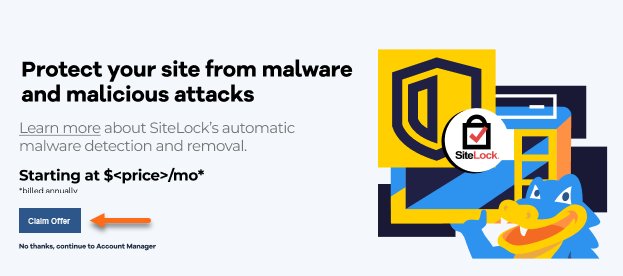
- You will be redirected to the SiteLock Claim Offer page. Click Learn more , and then click the Claim Offer button to make a purchase.
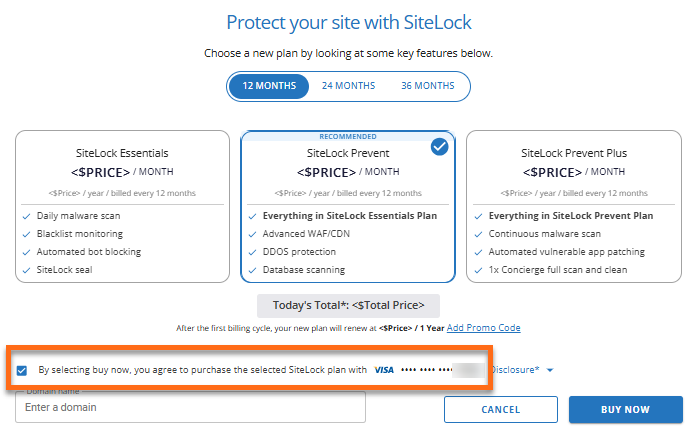
- Choose the SiteLock plan that suits your website's needs.
- Confirm your payment method.
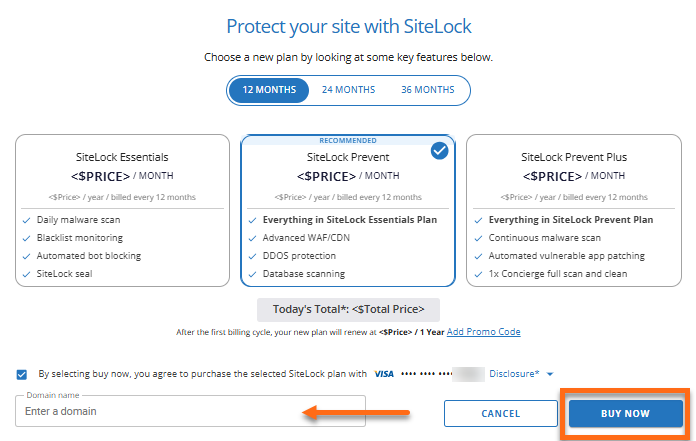
- You can choose the domain where you want SiteLock installed now or select it later. Then, click BUY NOW to process the order.
- You will receive a confirmation once the order is processed. Click CLOSE.

Via the Websites tab
To purchase SiteLock via the Websites tab:
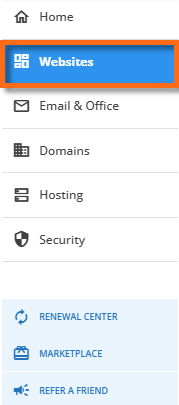
- Within your Customer Portal, click Websites on the left-hand menu.
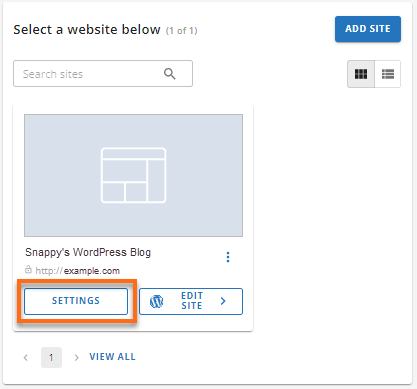
- Locate the website you need to manage with SiteLock and click its SETTINGS button.
- Select the SECURITY tab from the top menu.

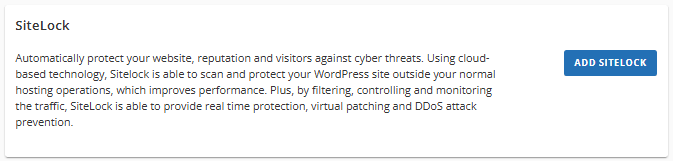
- Under the SiteLock section, click on the ADD SITELOCK button.
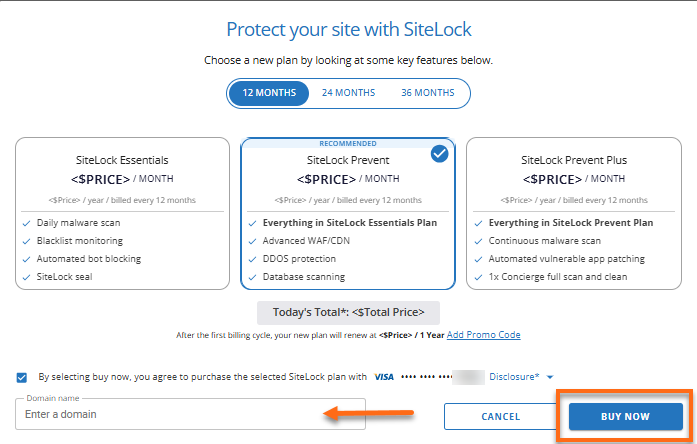
- A pop-up will appear. Select the SiteLock plan that suits the needs of your website.
- Make sure you have a payment method on file. Confirm your payment method.
- Select the domain to connect with SiteLock. You can also do this step later during your first setup. Click BUY NOW to process the order.
- A prompt will appear confirming that your order is processed. Click on CLOSE.
Via the Security tab
To purchase SiteLock via the Security tab:
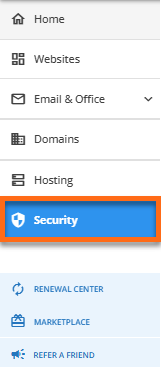
- Within your Customer Portal, click Security on the left-hand menu.
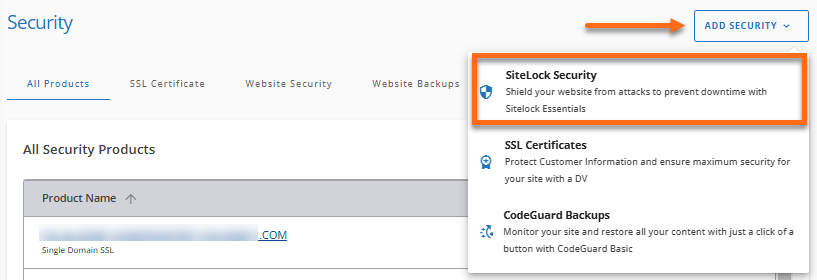
- You will see all security products under the All Products tab. Click on the ADD SECURITY dropdown menu in the top-right and select SiteLock Security from the list of options.
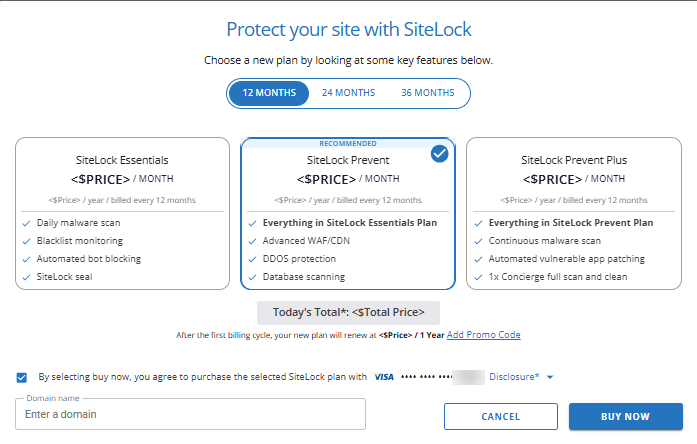
- A pop-up will appear. Select the SiteLock plan that suits the needs of your website.
- Make sure you have a payment method on file. Confirm your payment method.
- Select the domain to connect with SiteLock. You can also do this step later during your first setup. Click BUY NOW to process the order.
- A prompt will appear confirming that your order is processed. Click on CLOSE.
Via Marketplace
To purchase SiteLock via Marketplace:
- Within your Customer Portal, click Marketplace on the left-hand menu.

- Scroll down to the Security section and click CLAIM under the SiteLock card.

- Choose the SiteLock plan that suits your website's needs.
- Confirm your payment method.
- Choose the domain where you want the SiteLock to be installed, or select it later. Click BUY NOW to process the order.
- You will receive a confirmation once the order is processed. Click CLOSE.
How to Purchase SiteLock for VPS and Dedicated Hosting
For HostGator VPS and Dedicated hosting customers, you can purchase a subscription directly from SiteLock:
When you place an order directly with SiteLock, they will email you instructions on how to manage your account. Please note that you cannot manage your SiteLock account through the HostGator Customer Portal.
Related Articles
For SiteLock renewal prices, please check the Security tab section of your Customer Portal. You can also check the following article for the prices.
- Addon Price Chart | SiteLock
Here are helpful guides for SiteLock:
- SiteLock Overview & Resources
- SiteLock Upgrades, Cancellations, and Support
- SiteLock Website Security
- SiteLock Website Security Special Offer
- Welcome to SiteLock - An Intro to SiteLock Account