How to Lock or Unlock a Domain
- Domain Functions
- Register
- Transfer In
- Transfer Away
- Renew
- Domain Lock
- Domain Connections
- Domain Privacy + Protection
- Domain Expiration Protection
- Overview
- Nameservers
- DNS
- Contacts
- Security
- Move & Access
- Move Accounts
- Manage Users
- Request Ownership
- Change Ownership
- Request Auth Code
A domain lock is a security feature designed to keep your domain safe from unauthorized transfer to another registrar. Any domain you register with HostGator will automatically be set to a "locked " status, meaning it cannot be transferred away from us. To "unlock " means your domain can be transferred away from your HostGator account. For more information about the domain locks, please visit the following article:
- The Different Types of Domain Locks Explained
Here at HostGator, we want to make it easier for you to manage your hosting plans, billing, and domains in a single control panel. The following instructions will show you how to lock or unlock your domains within your Customer Portal. Unlocking your domain within your Customer Portal will get you access to your Authorization code (also known as authorization key, EPP key, EPP code, or transfer key), a unique code that protects your domain from being transferred away to another registrar. If you unlock your domain, this means you are allowing your domain to be transferred AWAY from your HostGator account, your current registrar.
- How to Lock or Unlock your Domain
- Related Articles
How to Lock or Unlock your Domain
You must be logged in as the Primary or Tech user to lock or unlock the domain within the Customer Portal. To enable (or disable) your domain's lock:
- Log in to your HostGator Customer Portal.
- Click Domains on the left-side menu.
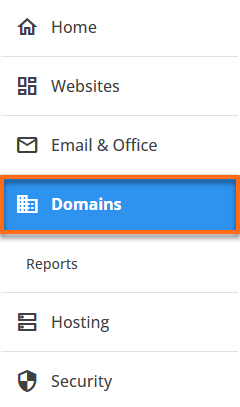
- If you have a single domain on your account , scroll down the domain's management page and look for the Domain lock section. If you have multiple domains in your account , select and click the domain you need to manage.
- Under the Overview tab, you will see a toggle switch in the Domain Lock section. Toggle it on or off to lock or unlock the domain.
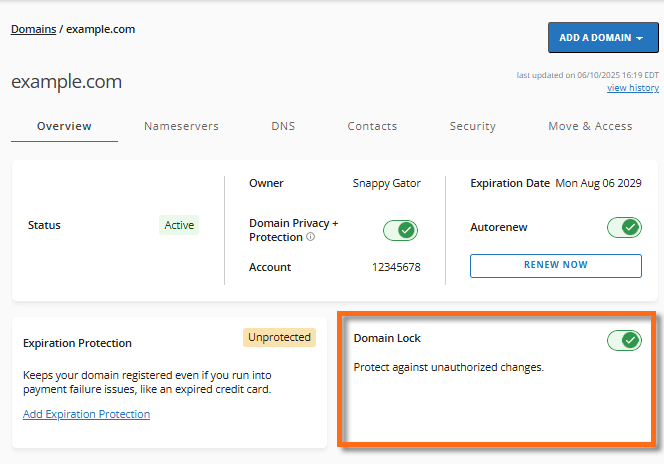
- If you lock the domain, it is secure from unauthorized transfer. Your domain is safe with us.

- If you unlock the domain , it is vulnerable to unauthorized transfer. However, if you intend to transfer this domain to another registrar, you can proceed with requesting your EPP Code (or Authorization code/key) by going to the Move & Access tab.

Related Articles
- How Can I Transfer My Domain to HostGator?
- How to Transfer a Domain from HostGator to Another Registrar
- The Different Types of Domain Locks Explained
- What is my EPP Code or Authorization Key?
Need additional assistance? Please contact HostGator's Support via phone or chat so we can assist you!